Convert XLS to CSV
Advanced XLS Converter is a lean and inexpensive utility that will let you convert XLS to CSV with the same accuracy and speed. Just open an Excel doc in the converter, check if the default output settings are fine and start the conversion. It’s that simple.
Advanced XLS Converter allows you convert a single excel file or folder with excel files to csv file format from GUI or command line.
1. Select the XLS (Excel) file or select folder with xls files for batch conversion.
2. Select the output csv file or folder for .csv files.
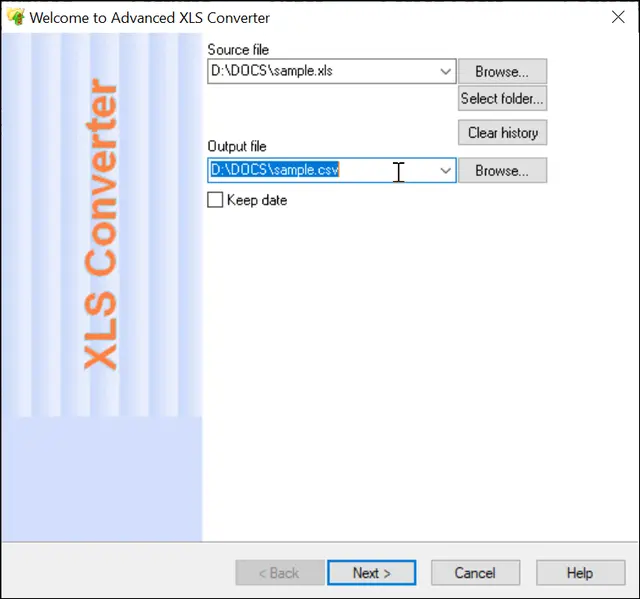
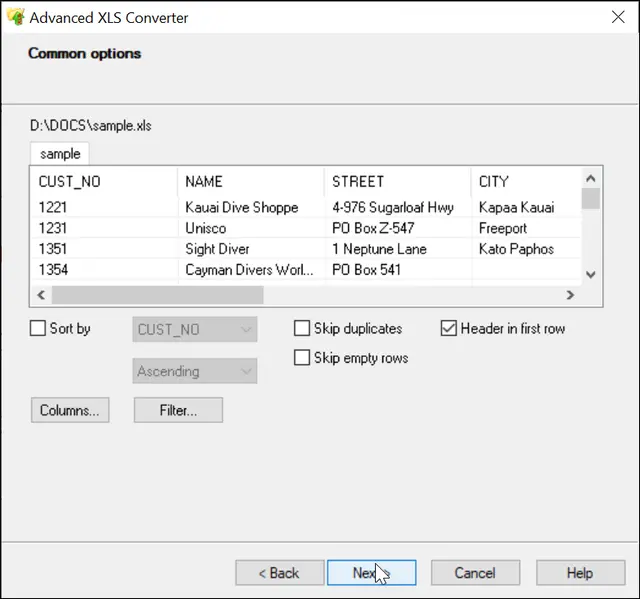
3. Preview, select options for sorting, filtering data (if necessary)
You can also select/unselect columns, set order for columns.
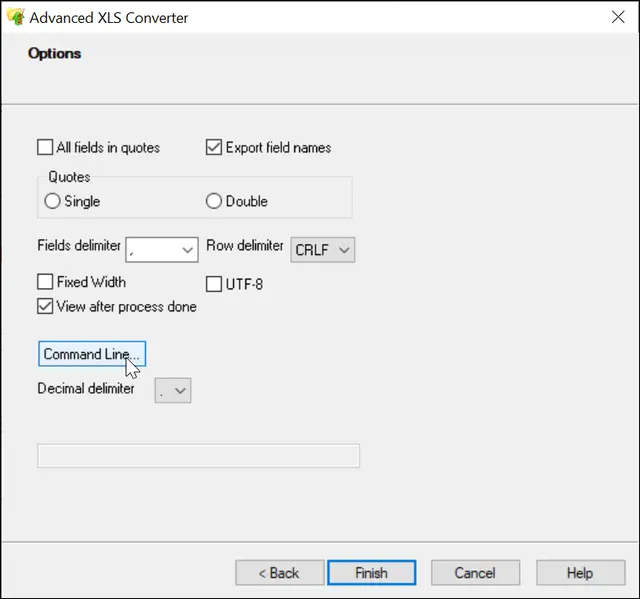
4. Select options for csv format: fields delimiter, rows delimiter (if necessary), and click "Finish"
How to Convert multiple files to CSV format
XLS to CSV Command Line
"c:\Program Files (x86)\Advanced XLS Converter\xlscnv.exe" table.xls file.csv [/FILTER | /COLUMNS [/EXCLUDE]| /COLUMNSLIST | /REVERSE | /SEP | /SEPTAB | /SEPPIPE | /SEPSPACE | /FIXEDWIDTH | /OPEN | /SKIPDUPS | /TEMPLATE | /MDY | /DMY | /YMD | /utf8 | /NOBOM | /KEEPDATE]
Simple XLS to CSV conversion
"c:\Program Files (x86)\Advanced XLS Converter\xlscnv.exe" sample.xls sample.csv
Convert XLS to CSV with columns selection
"c:\Program Files (x86)\Advanced XLS Converter\xlscnv.exe" sample.xls sample.csv /COLUMNS:NAME,STREET
Conversion with exclude columns
"c:\Program Files (x86)\Advanced XLS Converter\xlscnv.exe" sample.xls text.csv /COLUMNS:ID,ORDER /EXCLUDE
Convert XLS to Fixed Text Format
"c:\Program Files (x86)\Advanced XLS Converter\xlscnv.exe" sample.xls sample.csv /TYPES:NAME:C15,STREET:C20 /FIXEDWIDTH
Convert XLS to UTF-8 encoding
"c:\Program Files (x86)\Advanced XLS Converter\xlscnv.exe" sample.xls sample.csv /utf8
Convert to UTF-8 without BOM
"c:\Program Files (x86)\Advanced XLS Converter\xlscnv.exe" sample.xls sample.csv /utf8 /nobom
Using semicolon as delimiter
"c:\Program Files (x86)\Advanced XLS Converter\xlscnv.exe" sample.xls table.csv /SEP;
Skipping columns names
"c:\Program Files (x86)\Advanced XLS Converter\xlscnv.exe" sample.xls noheader.csv /nowritehdr
Convert Folder with XLS files to CSV format
"c:\Program Files (x86)\Advanced XLS Converter\xlscnv.exe" d:\base\*.xls d:\out\ /TOCSV
Rename columns
"c:\Program Files (x86)\Advanced XLS Converter\xlscnv.exe" sample.xls out.csv /COLUMNS:NAME:NEWNAME,ADDR:NEWADDR
Remove duplicate rows
"c:\Program Files (x86)\Advanced XLS Converter\xlscnv.exe" table.xls out.csv /SKIPDUPS
Conversion without header line
"c:\Program Files (x86)\Advanced XLS Converter\xlscnv.exe" table.xls out.csv /NOHDR
Conversion with Row ID in first column
"c:\Program Files (x86)\Advanced XLS Converter\xlscnv.exe" table.xls out.csv /ROWID
Keep date (as in original files)
"c:\Program Files (x86)\Advanced XLS Converter\xlscnv.exe" d:\base\*.xls d:\out\ /TOCSV /KEEPDATE
Do you need more options for CSV and Text formats ?
Please don't hesitate to Contact Us.